Reolink Security Cameras
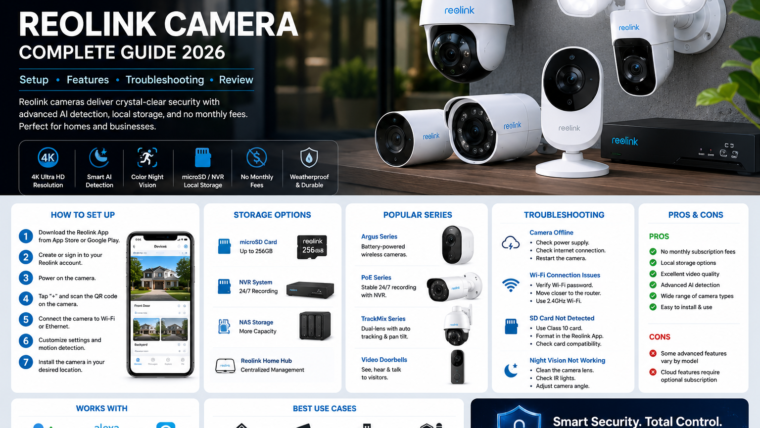
Discover everything about Reolink cameras, including setup instructions, key features, storage options, troubleshooting tips, and expert recommendations.
Key Features
📹 High-Resolution Video
Choose from 2K, 4K, and 12MP camera options for crystal-clear footage.
🧠 AI Detection
Receive alerts for people, vehicles, pets, and packages.
💾 Flexible Storage
Store footage locally using microSD cards, NVRs, NAS devices, or Home Hub.
🌙 Night Vision
Infrared and ColorX night vision options provide clear footage after dark.
🔊 Two-Way Audio
Talk to visitors remotely using the built-in speaker and microphone.
☀️ Solar Options
Select battery-powered cameras compatible with Reolink solar panels.
Popular Reolink Camera Series
- Argus Series: Battery-powered wireless cameras.
- PoE Series: Reliable wired cameras with 24/7 recording.
- TrackMix Series: Dual-lens auto-tracking cameras.
- Video Doorbells: Smart front-door monitoring solutions.
Storage Options
| Storage Method | Benefits | Considerations |
|---|---|---|
| microSD Card | No monthly fees | Limited capacity |
| NVR System | 24/7 recording | Additional hardware required |
| NAS Storage | Large storage capacity | Advanced setup |
| Reolink Home Hub | Centralized management | Compatible models only |
How to Set Up a Reolink Camera
- Download the Reolink app from Google Play Store or Apple App Store.
- Create or sign in to your Reolink account.
- Power on the camera or charge the battery.
- Tap Add Device in the app.
- Scan the QR code on the camera.
- Connect the camera to Wi-Fi or Ethernet.
- Configure motion detection and notifications.
- Install the camera in your preferred location.
Troubleshooting Guide
Camera Not Connecting to Wi-Fi
- Check the Wi-Fi password.
- Move the camera closer to the router.
- Restart the router.
- Verify the camera supports your Wi-Fi frequency.
microSD Card Not Detected
- Use a compatible Class 10 microSD card.
- Format the card in the Reolink app.
- Verify storage capacity limits.
Camera Offline
- Check the power supply.
- Verify internet connectivity.
- Update the camera firmware.
Pros & Cons
Advantages
- No mandatory subscription fees
- Excellent video quality
- Flexible storage options
- Wide range of camera types
- Smart AI detection
Limitations
- Advanced features vary by model
- Cloud services may require subscriptions
- Some integrations require additional setup
Frequently Asked Questions
Do Reolink cameras require a subscription?
No. Most Reolink cameras support local recording without monthly fees.
Can Reolink cameras record without internet?
Yes. Local recording works using microSD cards, NVRs, or NAS storage.
Do Reolink cameras work with Alexa?
Many Reolink cameras support Amazon Alexa and Google Assistant.
Final Verdict
Reolink cameras offer an excellent balance of affordability, privacy, and advanced features. With flexible storage options and no mandatory subscriptions, they are a great choice for homes and businesses.
Visit Reolink Official Website
Leave a Reply