📷
CamTechGuide
  • Home
  • About
  • Services
  • Contact
  • Blog
  • Home
  • About
  • Services
  • Contact
  • Blog
HomeUncategorizedBlog Idea: Arlo Pro 5S 2K Security Camera – Complete Setup, Features, Troubleshooting & User Guide
Uncategorized

Blog Idea: Arlo Pro 5S 2K Security Camera – Complete Setup, Features, Troubleshooting & User Guide

Vipul tiwari June 22, 2026 4 min read
Blog Idea: Arlo Pro 5S 2K Security Camera – Complete Setup, Features, Troubleshooting & User Guide

Advertisement

Arlo Pro 5S 2K Security Camera: Setup, Features & Troubleshooting Guide (2026)
Premium Wireless Security Camera

Arlo Pro 5S
2K Security Camera

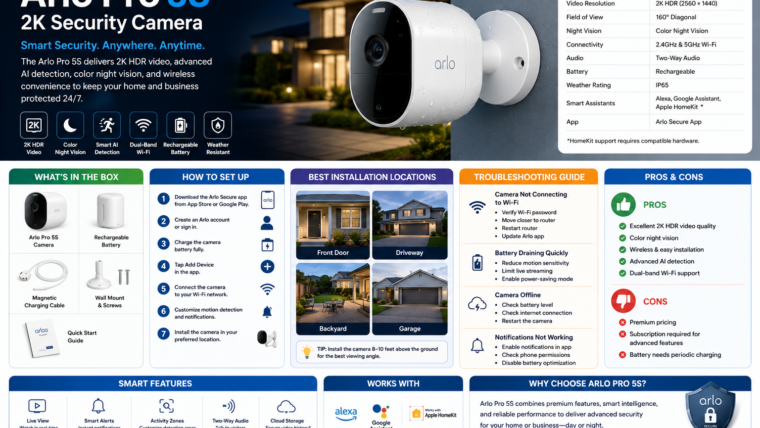
Discover everything about the Arlo Pro 5S, including setup instructions, smart features, installation tips, troubleshooting solutions, and expert recommendations.

📹 2K HDR Video 🌙 Color Night Vision 📡 Dual-Band Wi-Fi 🔋 Rechargeable Battery

Key Features

📹 2K HDR Resolution

Capture clear and detailed footage with enhanced HDR technology.

🌙 Color Night Vision

See people and objects clearly, even in low-light environments.

🔊 Two-Way Audio

Communicate remotely with visitors using built-in audio.

🧠 Smart AI Detection

Receive alerts for people, vehicles, animals, and packages.

📡 Dual-Band Wi-Fi

Supports both 2.4GHz and 5GHz networks.

☔ Weather Resistant

Designed for year-round indoor and outdoor protection.

Technical Specifications

Feature Specification
Resolution 2K HDR (2560 × 1440)
Field of View 160°
Night Vision Color Night Vision
Connectivity 2.4GHz & 5GHz Wi-Fi
Battery Rechargeable
Weather Rating IP65
Voice Assistants Alexa, Google Assistant

How to Set Up Arlo Pro 5S

  1. Download the Arlo Secure app from your app store.
  2. Create an Arlo account or sign in.
  3. Charge the camera battery fully.
  4. Tap Add Device in the app.
  5. Connect the camera to your Wi-Fi network.
  6. Customize motion detection and notifications.
  7. Install the camera in your preferred location.

Troubleshooting Guide

Camera Not Connecting to Wi-Fi

  • Verify your Wi-Fi password.
  • Move the camera closer to the router.
  • Restart the router.
  • Update the Arlo app.

Battery Draining Quickly

  • Reduce motion sensitivity.
  • Limit live video sessions.
  • Enable power-saving mode.

Camera Offline

  • Check battery level.
  • Verify internet connectivity.
  • Restart the camera.

Pros & Cons

Advantages

  • Excellent 2K HDR video quality
  • Color night vision
  • Wireless installation
  • Advanced AI detection
  • Dual-band Wi-Fi support

Limitations

  • Premium pricing
  • Advanced features require subscription
  • Battery requires periodic charging

Frequently Asked Questions

Does Arlo Pro 5S require a subscription?

Basic live viewing is free, while cloud recording and AI features require Arlo Secure.

Can the camera work without Wi-Fi?

No. Internet access is required for remote viewing and cloud services.

How long does the battery last?

Battery life depends on usage but can last several months on a single charge.

Final Verdict

The Arlo Pro 5S is an excellent premium security camera for users seeking high-quality video, advanced AI features, and flexible wireless installation.

Visit Arlo Official Website

Advertisement

Vipul tiwari
Vipul tiwari

Camera expert and photography enthusiast helping beginners fix camera problems.

← TP-Link Tapo C310 Outdoor Security Camera: Complete Setup, Features, Troubleshooting & User GuideReolink Security Cameras: Complete Setup, Features, Troubleshooting & Buying Guide →

Leave a Reply Cancel reply

Your email address will not be published. Required fields are marked *

Advertisement

Recent Posts

  • July 21, 2026
  • July 15, 2026
  • xmartO Wire-Free Solar Security Camera: Complete Step-by-Step Setup GuideJuly 14, 2026
  • Spy Camera , Hidden Camera Mini Security Camera, Nanny Cam with 180°Rotating Lens, 4K WiFi Wireless Surveillance, Motion Detection, Auto Night VisionJune 23, 2026
  • Arlo Essential Pan Tilt Security Camera 1080p HD (2025 Release) – Wired Plug-In Power Outdoor CameraJune 23, 2026

Categories

  • Uncategorized60

Recent Posts

  • (no title)
  • (no title)
  • xmartO Wire-Free Solar Security Camera: Complete Step-by-Step Setup Guide
  • Spy Camera , Hidden Camera Mini Security Camera, Nanny Cam with 180°Rotating Lens, 4K WiFi Wireless Surveillance, Motion Detection, Auto Night Vision
  • Arlo Essential Pan Tilt Security Camera 1080p HD (2025 Release) – Wired Plug-In Power Outdoor Camera

Recent Comments

No comments to show.

Archives

  • July 2026
  • June 2026

Categories

  • Uncategorized
📷
CamTechGuide

Helping beginners fix camera problems and capture better photos — for free. Based in India, trusted worldwide.

Fix Camera

  • Blurry Photos Fix
  • Battery Problems
  • Lens Issues
  • SD Card Errors
  • Phone Camera Fix

Learn

  • Beginner Guide
  • Camera Settings
  • Night Photography
  • Portrait Tips
  • Camera Reviews

Info

  • About Us
  • Contact
  • Privacy Policy
  • Disclaimer
  • Sitemap

© 2026 camtechguide.in · camtechguide.in · All rights reserved.

Privacy · Disclaimer · Contact