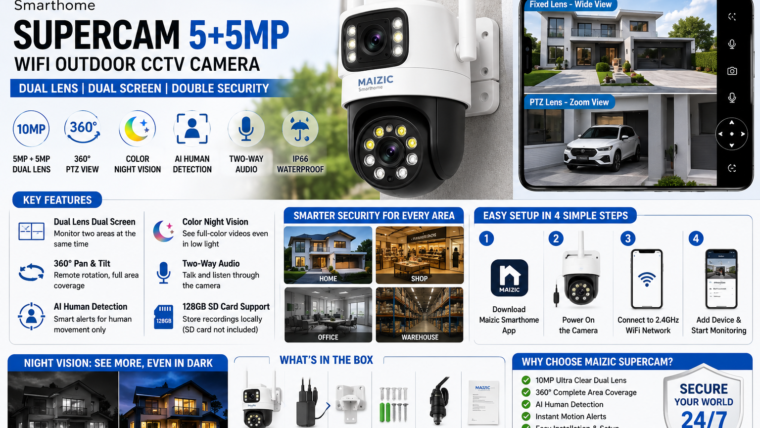
Maizic Smarthome Supercam 5+5MP WiFi Outdoor CCTV Camera Review & Setup Guide
Discover the features, installation process, mobile app setup, AI detection capabilities, and troubleshooting tips for the Maizic Supercam dual-lens outdoor security camera.
The Maizic Smarthome Supercam 5+5MP is a dual-lens outdoor WiFi CCTV camera that combines a fixed wide-angle lens and a PTZ lens for complete property coverage. It features AI human detection, color night vision, two-way communication, and weather-resistant protection for reliable outdoor security.
Technical Specifications
| Feature | Specification |
|---|---|
| Camera Type | Outdoor WiFi PTZ Camera |
| Resolution | 5MP + 5MP Dual Lens (10MP Combined View) |
| Connectivity | 2.4GHz WiFi |
| Pan & Tilt | 360° Remote PTZ Control |
| Night Vision | Color Night Vision + Infrared |
| Storage | microSD Card up to 128GB |
| Audio | Two-Way Talk |
| Weather Rating | IP66 Waterproof |
| Smart Features | AI Human Detection & Motion Tracking |
Key Features
Dual-Lens Monitoring
View two camera angles simultaneously with split-screen monitoring.
360° PTZ Coverage
Pan, tilt, and zoom remotely to monitor large outdoor spaces.
Color Night Vision
Capture full-color footage at night using integrated white LEDs.
AI Human Detection
Reduce false alarms by detecting only human movement.
Two-Way Audio
Talk to visitors or warn intruders directly through the app.
IP66 Weatherproof
Built to withstand rain, dust, and harsh outdoor conditions.
What’s in the Box?
- Maizic Supercam 5+5MP Camera
- Power Adapter
- Mounting Bracket
- Waterproof Connector Kit
- Mounting Screws
- User Manual
How to Set Up the Camera
Download the Maizic App
Install the Maizic Smarthome app from the Google Play Store or Apple App Store.
Power On the Camera
Connect the supplied power adapter and wait for the status LED to blink.
Connect to WiFi
Select your 2.4GHz network, enter the password, and complete the pairing process.
Install Outdoors
Mount the camera 8–10 feet above the ground for optimal coverage.
Troubleshooting Tips
Camera Offline
- Restart the camera and router.
- Ensure the WiFi network is 2.4GHz.
- Check signal strength at the installation location.
Motion Alerts Not Working
- Enable AI detection in the app.
- Increase motion sensitivity.
- Allow notification permissions.
microSD Card Not Detected
- Use a Class 10 microSD card.
- Format the card using the app.
- Use a card up to 128GB.
Pros & Cons
Pros
- Dual-lens monitoring
- 360° PTZ control
- Color night vision
- AI human detection
- IP66 weatherproof design
Cons
- Supports only 2.4GHz WiFi
- Cloud storage may require a subscription
- Performance depends on internet speed
Frequently Asked Questions
Does the camera support 5GHz WiFi?
No, it supports only 2.4GHz WiFi networks.
Can I use the camera without cloud storage?
Yes, you can record locally using a microSD card up to 128GB.
Is the camera waterproof?
Yes, the camera features an IP66 weatherproof rating.
Can multiple users access the camera?
Yes, you can share access through the Maizic Smarthome app.

Leave a Reply