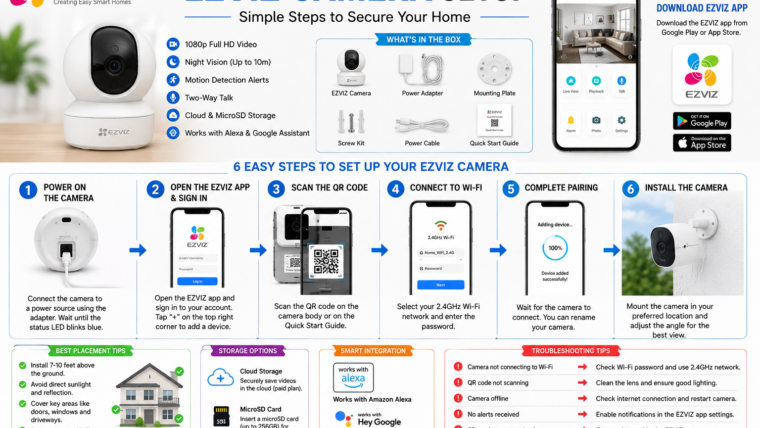
EZVIZ Camera Setup Guide 2026: Installation, Configuration & Troubleshooting
EZVIZ cameras offer smart security solutions for homes and businesses with features such as HD video, motion detection, cloud storage, and remote access through the EZVIZ mobile app.
Why Choose an EZVIZ Camera?
- Easy DIY installation
- 1080p HD and 2K video quality
- Smart motion detection alerts
- Two-way audio communication
- Night vision support
- Cloud and local storage options
- Remote monitoring through the EZVIZ app
- Alexa and Google Assistant integration
Popular EZVIZ Camera Models
- EZVIZ C6N – Indoor pan-and-tilt camera
- EZVIZ H8c – Outdoor pan-and-tilt camera
- EZVIZ C8W Pro – Advanced outdoor security camera
- EZVIZ TY1 – Indoor smart camera
- EZVIZ DB2 – Smart video doorbell
What’s Included in the Box?
- EZVIZ camera
- Power adapter
- USB cable
- Mounting bracket and screws
- Quick start guide
- Drill template
Before You Begin
- A stable 2.4 GHz Wi-Fi network
- Android or iPhone smartphone
- EZVIZ mobile app installed
- Your Wi-Fi password
- MicroSD card (optional)
Download the EZVIZ App
Download the official EZVIZ app from your device’s app store and sign in or create a new account.
How to Set Up Your EZVIZ Camera
Step 1: Power On the Camera
Connect the camera using the supplied power adapter and wait for the status LED to start blinking.
Step 2: Open the EZVIZ App
Launch the app and tap the + icon to add a new device.
Step 3: Scan the QR Code
Locate the QR code on the camera or quick start guide and scan it using the app.
Step 4: Connect to Wi-Fi
Select your 2.4 GHz Wi-Fi network and enter the password.
Step 5: Complete Pairing
Wait for the camera to connect successfully and assign a device name.
Step 6: Install the Camera
Mount the camera securely and adjust the viewing angle for optimal coverage.
Best Installation Tips
- Install cameras 7–10 feet above ground.
- Avoid direct sunlight and reflective surfaces.
- Cover key entry points such as doors and garages.
- Ensure strong Wi-Fi signal strength.
- Avoid aiming the camera at busy roads or moving trees.
Configure Important Settings
- Motion detection sensitivity
- Detection zones
- Notification preferences
- Night vision mode
- Recording schedule
- Video quality settings
- Two-way audio
Storage Options
Cloud Storage
EZVIZ offers optional cloud storage plans for secure online backups.
Local Storage
Most EZVIZ cameras support microSD cards for local recording.
Smart Home Integration
EZVIZ cameras work with Amazon Alexa and Google Assistant.
- “Alexa, show the front door camera.”
- “Hey Google, show the backyard camera.”
Common EZVIZ Problems & Solutions
| Problem | Solution |
|---|---|
| Camera won’t connect to Wi-Fi | Ensure you are using a 2.4 GHz network. |
| QR code not scanning | Improve lighting and clean the camera lens. |
| Camera offline | Restart the router and camera. |
| No motion alerts | Check notification permissions in the app. |
| Poor video quality | Improve Wi-Fi signal strength. |
| microSD card not detected | Format the card through the EZVIZ app. |
How to Reset an EZVIZ Camera
- Locate the reset button on the camera.
- Press and hold it for 5–10 seconds.
- Wait for the status light to change.
- Reconnect the camera using the EZVIZ app.
Refer to your camera’s user manual for model-specific reset instructions.
- Enable two-factor authentication.
- Use a strong, unique password.
- Keep the camera firmware updated.
- Review shared access permissions regularly.
- Secure your Wi-Fi network with WPA2 or WPA3 encryption.
Frequently Asked Questions
Can I use an EZVIZ camera without Wi-Fi?
Most smart features, including remote viewing and notifications, require an internet connection.
Do I need a subscription?
No. Most EZVIZ cameras support local recording with a microSD card.
Why is my EZVIZ camera offline?
Common causes include weak Wi-Fi signals, power interruptions, or router issues.
Does EZVIZ support two-way audio?
Yes. Most EZVIZ cameras include built-in microphones and speakers.
How many cameras can I add to one account?
You can manage multiple EZVIZ devices from a single account.
With simple installation, reliable performance, and smart features, EZVIZ cameras are an excellent choice for protecting your home or business.

Leave a Reply