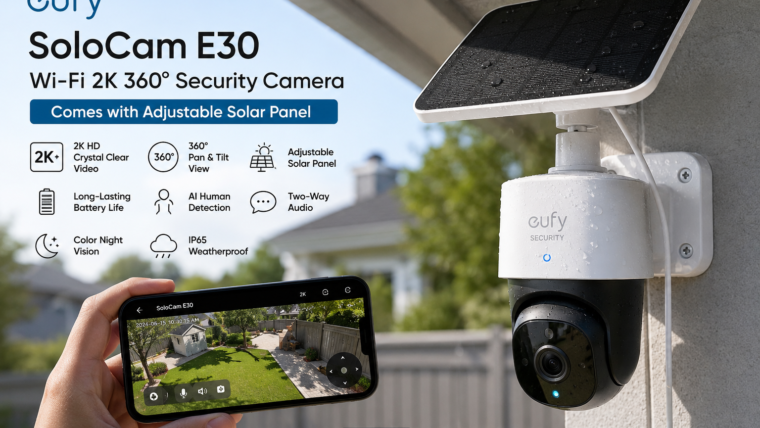
Eufy SoloCam E30 Wi-Fi 2K 360° Security Camera
Complete Setup Guide, Features, Installation & User Manual
Introduction
The Eufy SoloCam E30 is a modern wireless outdoor security camera designed for homeowners who want reliable surveillance without complicated wiring. Featuring crystal-clear 2K video, 360° pan and tilt coverage, AI-powered motion detection, and an adjustable solar panel, the SoloCam E30 provides around-the-clock protection with minimal maintenance.
Whether you need to monitor your front door, backyard, driveway, garage, or business, this smart camera offers excellent image quality and intelligent security features.
Key Features
📹 2K HD Resolution
Capture sharp video with enhanced details, faces, vehicles, and packages.
🔄 360° Coverage
Pan and tilt functionality helps eliminate blind spots around your property.
☀️ Solar Powered
Comes with an adjustable solar panel to keep the battery charged automatically.
🌙 Color Night Vision
View important details during nighttime with advanced night vision technology.
🤖 AI Motion Detection
Smart AI distinguishes people, vehicles, and other movements.
🎤 Two-Way Audio
Talk to visitors and hear what’s happening in real time through the mobile app.
Technical Specifications
| Specification | Details |
|---|---|
| Video Resolution | 2K HD |
| Field of View | 360° Pan & Tilt |
| Connectivity | 2.4GHz Wi-Fi |
| Power Source | Rechargeable Battery + Solar Panel |
| Night Vision | Infrared & Color Night Vision |
| Audio | Two-Way Communication |
| Motion Detection | AI Human Detection |
| Weather Protection | Outdoor Weather Resistant |
| Storage | Local & Cloud Options |
How to Install Eufy SoloCam E30
Best Locations for Installation
- Front Door Security Monitoring
- Driveway Surveillance
- Garage Entrance Protection
- Backyard Observation
- Garden Monitoring
- Farm and Rural Property Security
- Warehouse and Business Premises
Solar Panel Tips
- Install the solar panel facing direct sunlight.
- Avoid trees, roofs, or structures that create shadows.
- Clean the panel regularly for better charging performance.
- Use the adjustable mount to optimize sun exposure.
- Check battery status monthly through the app.
Motion Detection Settings
The Eufy Security App allows users to customize detection zones and sensitivity levels. You can create activity zones to focus on important areas and reduce false alerts from roads, trees, pets, or passing vehicles.
- Human Detection
- Motion Sensitivity Control
- Custom Activity Zones
- Instant Push Notifications
- Smart Recording Triggers
Common Troubleshooting
Camera Offline
Ensure your Wi-Fi signal is strong and the camera battery is charged.
Solar Panel Not Charging
Verify direct sunlight exposure and inspect cable connections.
No Motion Alerts
Check notification permissions and motion detection settings.
Poor Video Quality
Clean the lens and ensure a stable internet connection.
App Connection Issues
Restart the camera, router, and mobile application.
Pros & Cons
Advantages
- Sharp 2K video quality
- 360° viewing coverage
- Solar-powered operation
- Easy wireless installation
- Smart AI detection
- Reliable mobile alerts
- Weather-resistant design
Limitations
- Requires strong Wi-Fi coverage
- Solar charging depends on sunlight availability
- Advanced cloud features may require subscription
- 2.4GHz Wi-Fi only in some regions
Final Verdict
The Eufy SoloCam E30 Wi-Fi 2K 360° Security Camera is an excellent choice for homeowners seeking a smart, wire-free surveillance solution. Its combination of high-resolution video, full-area coverage, intelligent AI detection, and solar-powered convenience makes it one of the most practical outdoor security cameras available today.
For users who want reliable security without frequent battery charging or complicated installation, the SoloCam E30 delivers outstanding value and performance.

Leave a Reply