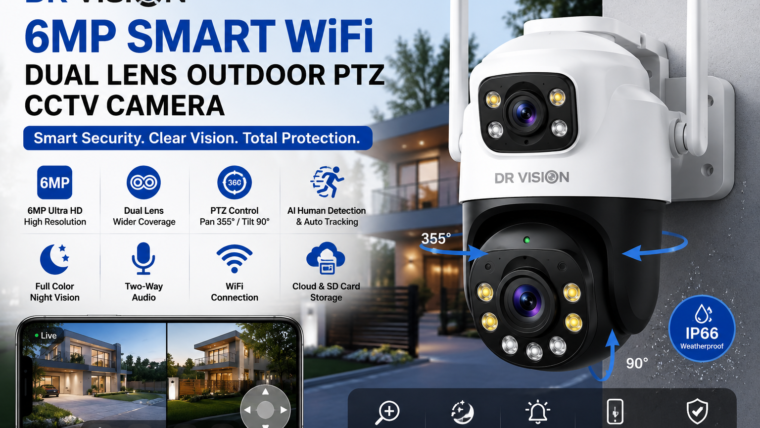
Dr Vision 6MP Smart WiFi Dual Lens Outdoor PTZ CCTV Camera
Secure your property with ultra-clear 6MP video, dual-lens technology, smart AI detection, full-color night vision, and advanced PTZ controls.
6MP Ultra HD
Capture detailed footage with enhanced clarity for faces, vehicles, and outdoor activity.
Dual Lens View
Monitor larger areas with wider coverage and fewer blind spots.
PTZ Control
Pan, tilt, and zoom remotely using the smartphone application.
Color Night Vision
Stay protected 24/7 with infrared and full-color night vision modes.
Overview
The Dr Vision 6MP Smart WiFi Dual Lens Outdoor PTZ CCTV Camera is designed for homeowners and businesses seeking reliable outdoor surveillance. Its intelligent dual-lens system, motorized PTZ functionality, and AI-powered motion detection provide complete security coverage with minimal blind spots.
Key Features
6MP Ultra HD Resolution
- Sharp and detailed video quality
- Enhanced digital zoom performance
- Improved face and vehicle recognition
Dual Lens Technology
- Wider viewing coverage
- Reduced blind spots
- Enhanced outdoor monitoring
AI Human Detection & Auto Tracking
Smart AI technology accurately identifies human movement and automatically tracks activity in real time.
Two-Way Audio
Communicate with visitors or warn intruders using the built-in speaker and microphone.
Technical Specifications
| Feature | Specification |
|---|---|
| Camera Type | Outdoor PTZ WiFi Camera |
| Resolution | 6MP Ultra HD |
| Lens Type | Dual Lens |
| WiFi Support | 2.4GHz WiFi |
| Pan Rotation | Up to 355° |
| Tilt Rotation | Up to 90° |
| Night Vision | Infrared & Full-Color Night Vision |
| Motion Detection | AI Human Detection & Auto Tracking |
| Storage | MicroSD Card, Cloud Storage, NVR |
| Weather Rating | IP65 / IP66 |
Benefits of Using Dr Vision PTZ Camera
Installation & Setup Guide
- Download the Dr Vision mobile application.
- Connect the camera to a stable power source.
- Press the reset button for 5–10 seconds.
- Open the app and add a new device.
- Connect the camera to a 2.4GHz WiFi network.
- Scan the QR code to complete pairing.
- Adjust motion alerts and PTZ settings.
- Mount the camera 8–12 feet above ground level.
Best Installation Locations
- Front gate
- Driveway
- Garage entrance
- Backyard
- Parking area
- Warehouse entrance
Frequently Asked Questions
Does this camera support 5GHz WiFi?
Most WiFi PTZ cameras support only 2.4GHz networks for improved coverage.
Can the camera record without internet access?
Yes. Local recording to a microSD card can continue even when the internet is unavailable.
Can multiple users access the camera?
Yes. Secure sharing options allow family members or team members to access the camera.
What storage capacity is recommended?
A 64GB or 128GB microSD card is recommended for longer recording periods.

Leave a Reply