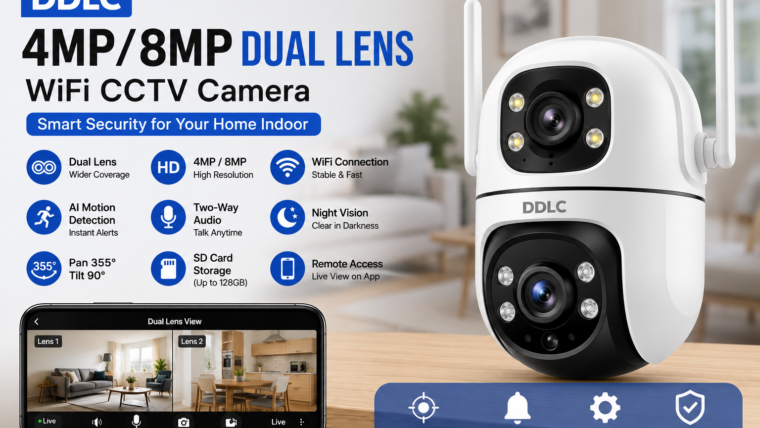
DDLC 4MP/8MP Dual Lens WiFi CCTV Camera for Home Indoor
Experience smarter indoor surveillance with dual-lens technology, AI motion detection, night vision, two-way audio, and remote monitoring from anywhere.
4MP / 8MP HD Video
Capture crystal-clear footage with enhanced details and digital zoom.
Dual Lens View
Wider coverage with reduced blind spots for complete room monitoring.
AI Motion Tracking
Automatically detects and follows moving subjects in real time.
Remote Access
Watch live video and receive alerts directly on your smartphone.
Overview
The DDLC 4MP/8MP Dual Lens WiFi CCTV Camera is a modern indoor security camera designed for homes, apartments, offices, and pet monitoring. Its innovative dual-lens system provides a wider field of view, while intelligent tracking and remote access features ensure complete peace of mind.
Key Features
Dual Lens Technology
- Wider viewing angles
- Reduced blind spots
- Improved zoom capabilities
- Enhanced room coverage
Smart Motion Detection & Auto Tracking
The camera automatically detects motion, tracks movement, and sends instant notifications to your smartphone.
Two-Way Audio
Built-in microphone and speaker allow you to communicate with family members, visitors, or pets remotely.
Night Vision
- Infrared night vision
- Full-color night vision
- Clear monitoring in low-light conditions
Technical Specifications
| Feature | Specification |
|---|---|
| Camera Type | Indoor WiFi CCTV Camera |
| Resolution | 4MP / 8MP |
| Lens Type | Dual Lens |
| WiFi Support | 2.4GHz WiFi |
| Pan Rotation | Up to 355° |
| Tilt Rotation | Up to 90° |
| Audio | Two-Way Audio |
| Storage | MicroSD Card, Cloud Storage, NVR |
| Mobile App | Android & iOS Compatible |
Benefits of DDLC Dual Lens Camera
Installation & Setup Guide
- Download the DDLC mobile application.
- Connect the camera to a power source.
- Reset the camera using the reset button.
- Open the app and add a new device.
- Connect the camera to your 2.4GHz WiFi network.
- Scan the QR code to pair the device.
- Configure motion detection and recording settings.
- Place the camera in your preferred location.
Troubleshooting Tips
- Ensure you are using a 2.4GHz WiFi network.
- Place the camera close to the router during setup.
- Restart the camera if live view is unavailable.
- Update the mobile app and camera firmware regularly.
- Check notification permissions if alerts are not working.
Frequently Asked Questions
Does the DDLC camera support 5GHz WiFi?
Most DDLC models support only 2.4GHz WiFi networks.
Can I record videos without the internet?
Yes. Local recording to a microSD card may continue even if the internet is unavailable.
Can multiple users access the camera?
Yes. You can securely share access with family members through the mobile app.
What storage size is recommended?
A 64GB or 128GB microSD card is recommended for longer recording periods.

Leave a Reply