CP PLUS 2.4MP Full HD Indoor Dome Camera Review & Setup Guide
Discover the features, specifications, installation process, DVR setup, night vision performance, and troubleshooting tips for the CP PLUS 2.4MP Indoor Dome Camera.

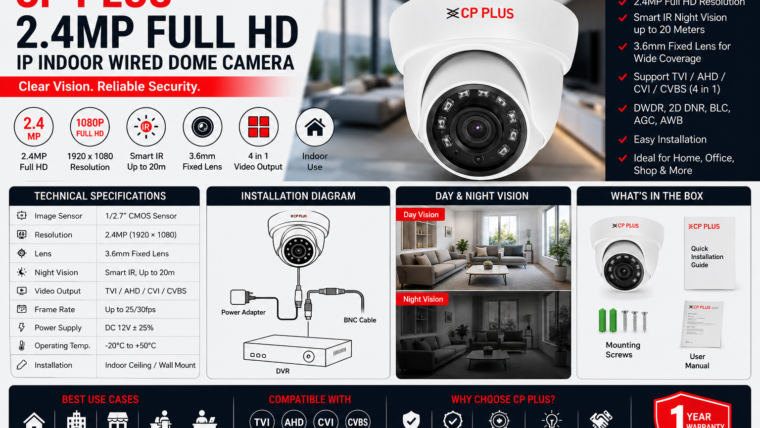
The CP PLUS 2.4MP Full HD Indoor Dome Camera is a reliable wired surveillance solution for homes, offices, retail stores, and small businesses. It delivers high-quality Full HD video, infrared night vision, and seamless compatibility with hybrid DVR systems.
Technical Specifications
| Feature | Specification |
|---|---|
| Camera Type | Indoor Wired Dome Camera |
| Resolution | 2.4MP Full HD (1920 × 1080) |
| Image Sensor | 1/2.7-inch CMOS Sensor |
| Lens | 3.6mm Fixed Lens |
| Night Vision | Smart IR up to 20 meters |
| Video Output | TVI / AHD / CVI / CVBS |
| Power Supply | DC 12V |
| Operating Temperature | -20°C to +50°C |
Key Features
2.4MP Full HD Video
Capture clear and detailed footage with Full HD resolution for better facial recognition.
Smart IR Night Vision
View clear video up to 20 meters in complete darkness with automatic IR adjustment.
Wide Viewing Angle
The 3.6mm lens covers a wide indoor area with minimal blind spots.
Hybrid DVR Compatibility
Supports TVI, AHD, CVI, and CVBS formats for easy integration with existing systems.
Image Enhancement
Features DWDR, 2D DNR, BLC, and automatic white balance for improved video quality.
Compact Dome Design
Modern and discreet design suitable for offices, shops, and indoor environments.
What’s Included in the Box?
- CP PLUS 2.4MP Dome Camera
- Mounting Screws
- User Manual
- Warranty Card
Note: DVR, power adapter, and video cables may need to be purchased separately.
Installation Guide
Select the Installation Location
Choose a ceiling or wall position that covers the desired area without obstructions.
Mount the Camera
Mark the holes, drill them, and secure the camera using the supplied screws.
Connect Power & Video Cable
Attach the BNC video cable to the DVR and connect the 12V power adapter.
Adjust the Viewing Angle
Rotate the camera lens to achieve the required coverage area.
Configure the DVR
Enable recording schedules, motion detection, and remote viewing through the mobile app.
Best Use Cases
- Home living rooms
- Offices and meeting rooms
- Retail stores
- Reception areas
- Schools and classrooms
- Indoor corridors
Troubleshooting Tips
No Video Signal
- Check the power supply connection.
- Verify BNC cable connections.
- Confirm the DVR input channel.
Blurry Image
- Clean the camera lens.
- Adjust the camera angle.
- Check for low-light conditions.
Poor Night Vision
- Remove reflective objects near the camera.
- Ensure IR LEDs are not blocked.
- Clean the dome cover regularly.
Pros & Cons
Pros
- Affordable pricing
- Reliable wired connection
- Clear Full HD recording
- Excellent night vision
- Compatible with multiple DVR formats
Cons
- Requires cable installation
- Indoor use only
- DVR required for recording
- Limited smart AI features
Frequently Asked Questions
Can I use this camera without a DVR?
No. This wired dome camera requires a compatible DVR for recording and remote viewing.
How far can the night vision see?
The camera provides infrared night vision coverage up to 20 meters.
Is this camera suitable for outdoor use?
No. This model is designed specifically for indoor installations.
Does it support mobile viewing?
Yes, remote viewing is available when connected to a compatible CP PLUS DVR and mobile app.

Leave a Reply