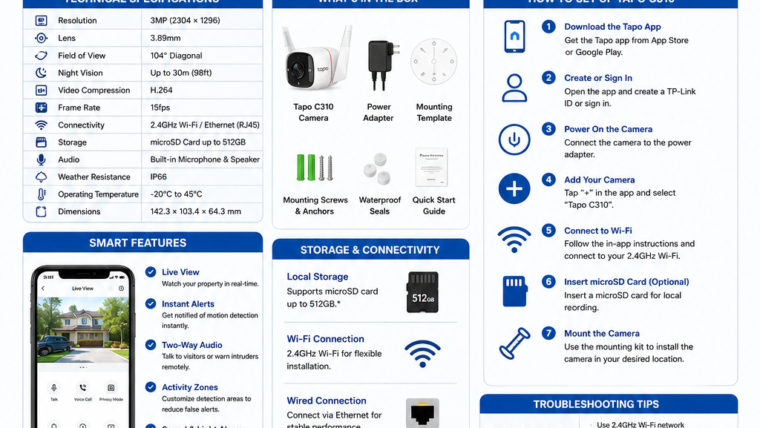
TP-Link Tapo C310 Outdoor Security Camera
Discover everything about the Tapo C310, including features, setup instructions, storage options, troubleshooting tips, and expert recommendations.
Overview
The TP-Link Tapo C310 is a budget-friendly outdoor security camera designed for homes, offices, shops, garages, and warehouses. It offers 2K video recording, smart motion detection, weatherproof protection, and local storage without requiring a monthly subscription.
Key Features
📹 2K Ultra-Clear Video
Capture sharp and detailed footage with 3MP resolution.
🌙 Night Vision
See up to 30 meters (98 feet) in complete darkness.
🔊 Two-Way Audio
Communicate remotely using the built-in speaker and microphone.
💾 Local Storage
Support for microSD cards up to 512GB.
📡 Dual Connectivity
Connect using 2.4GHz Wi-Fi or Ethernet.
☔ IP66 Weatherproof
Designed to withstand rain, dust, and harsh outdoor conditions.
Technical Specifications
| Feature | Specification |
|---|---|
| Resolution | 3MP (2304 × 1296) |
| Night Vision | Up to 30m (98ft) |
| Connectivity | 2.4GHz Wi-Fi / Ethernet |
| Storage | microSD Card up to 512GB |
| Audio | Built-in Microphone and Speaker |
| Weather Rating | IP66 |
| Voice Assistants | Amazon Alexa & Google Assistant |
How to Set Up Tapo C310
- Download the Tapo app from Google Play Store or Apple App Store.
- Create or sign in to your TP-Link account.
- Connect the camera to power.
- Insert a microSD card if required.
- Open the Tapo app and tap the “+” icon.
- Select “Tapo C310” and follow the setup instructions.
- Connect the camera to a 2.4GHz Wi-Fi network.
- Mount the camera securely outdoors.
Troubleshooting Guide
Camera Not Connecting to Wi-Fi
- Ensure you are using a 2.4GHz network.
- Restart your router.
- Move the camera closer to the router.
- Reset the camera and reconnect.
microSD Card Not Detected
- Use a Class 10 microSD card.
- Format the card using the Tapo app.
- Ensure the card capacity does not exceed 512GB.
Camera Offline
- Verify the power supply.
- Check your internet connection.
- Restart the camera and router.
Pros & Cons
Advantages
- No mandatory subscription fees
- Affordable pricing
- Excellent 2K video quality
- IP66 weatherproof protection
- Supports local storage
- Easy installation
Limitations
- Supports only 2.4GHz Wi-Fi
- No built-in battery
- Continuous power connection required
- Cloud storage requires a subscription
Frequently Asked Questions
Does Tapo C310 require a subscription?
No. Local recording works without any monthly subscription.
Does the Tapo C310 support 5GHz Wi-Fi?
No. The camera supports only 2.4GHz Wi-Fi networks.
Can I use the camera without the internet?
Local recording can continue, but remote access requires an internet connection.
Is the Tapo C310 waterproof?
Yes. It has an IP66 weatherproof rating for outdoor use.
Final Verdict
The TP-Link Tapo C310 is one of the best value-for-money outdoor security cameras available today. It delivers excellent video quality, reliable performance, local storage, and weatherproof protection at an affordable price.
Learn More
Leave a Reply