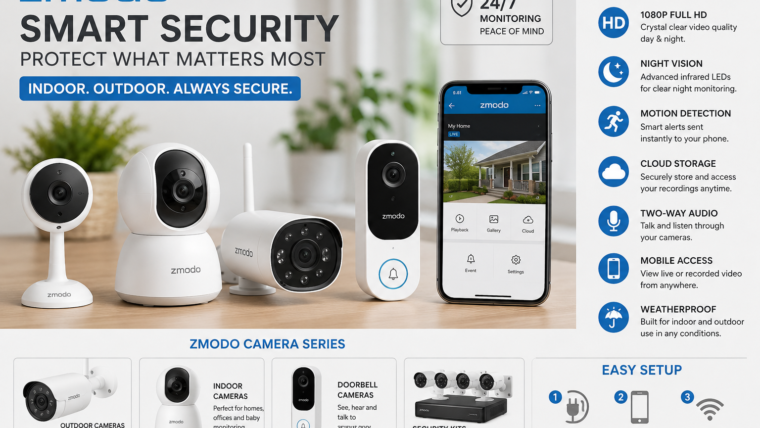
Zmodo Security Cameras Complete Guide
Features, Installation, App Setup, Cloud Recording, Smart Home Integration & Complete Security Review
Introduction
Zmodo is one of the most popular smart home security brands, offering a wide range of indoor cameras, outdoor cameras, doorbell cameras, and complete surveillance systems. Known for affordability and easy setup, Zmodo cameras provide remote monitoring, motion alerts, cloud storage, night vision, and smartphone access.
Zmodo offers one of the largest selections of home security cameras with affordable pricing, easy installation, and user-friendly mobile monitoring.
Popular Zmodo Camera Models
| Model | Best For |
|---|---|
| Zmodo Outdoor WiFi Camera | Outdoor Security Monitoring |
| Zmodo Indoor Camera | Home & Baby Monitoring |
| Zmodo Doorbell Camera | Front Door Security |
| Zmodo PT Camera | Pan & Tilt Monitoring |
| Zmodo Wireless Security Kit | Complete Home Security |
Main Features
📹 HD Video Recording
Capture clear and detailed footage for home and business surveillance.
🌙 Night Vision
Monitor your property even in complete darkness.
📱 Mobile App Access
View live video feeds directly from your smartphone.
🚨 Motion Detection Alerts
Receive instant notifications whenever movement is detected.
☁ Cloud Storage
Securely store recordings online for easy access.
🎤 Two-Way Audio
Talk and listen through supported camera models.
🏠 Smart Home Compatibility
Works with selected smart home devices and assistants.
📡 Remote Monitoring
Check your property from anywhere in the world.
Technical Specifications
| Feature | Details |
|---|---|
| Video Resolution | 720p / 1080p HD |
| Night Vision | Infrared Night Vision |
| Motion Detection | Smart Motion Alerts |
| Connectivity | Wi-Fi & Wired Models |
| Storage | Cloud Storage |
| Audio | Two-Way Audio (Model Dependent) |
| Mobile Support | Android & iOS |
| Weather Resistance | Outdoor Models Available |
Zmodo App Setup Guide
- Download the Zmodo App from Google Play Store or Apple App Store.
- Create a new Zmodo account.
- Connect your camera to power.
- Open the app and tap Add Device.
- Select your camera model.
- Connect the camera to Wi-Fi.
- Scan the QR code if required.
- Name your camera.
- Complete setup.
- Start live monitoring.
Best Uses For Zmodo Cameras
- Home Security
- Apartment Monitoring
- Baby Monitoring
- Pet Monitoring
- Office Security
- Front Door Surveillance
- Garage Protection
- Vacation Home Monitoring
- Shop Security
- Warehouse Monitoring
Advantages of Zmodo Cameras
- Affordable Pricing
- Easy DIY Installation
- User-Friendly Mobile App
- Reliable Motion Detection
- Cloud Recording Options
- Remote Access Anywhere
- Indoor & Outdoor Models
- Expandable Camera Systems
- Night Vision Support
- Smart Notifications
Pros & Cons
| Pros | Cons |
|---|---|
| Affordable Security Solution | Advanced Features May Require Subscription |
| Easy Installation | Cloud Storage Costs Extra |
| Remote Monitoring | Requires Stable Internet |
| Wide Product Selection | Limited Local Storage On Some Models |
| Good Mobile App | Video Quality Depends On Model |
Zmodo vs Traditional CCTV
| Feature | Zmodo Cameras | Traditional CCTV |
|---|---|---|
| Mobile Viewing | Yes | Limited |
| Cloud Storage | Available | No |
| Easy Installation | Very Easy | Complex |
| Smart Alerts | Yes | Basic |
| Remote Monitoring | Yes | Limited |
Final Verdict
Zmodo offers one of the largest and most versatile selections of security cameras available today. From indoor monitoring and baby cameras to outdoor surveillance and complete security systems, Zmodo provides reliable protection at a budget-friendly price.
For homeowners, renters, small businesses, and users looking for simple DIY installation, Zmodo remains one of the best value-for-money security camera brands.

Leave a Reply