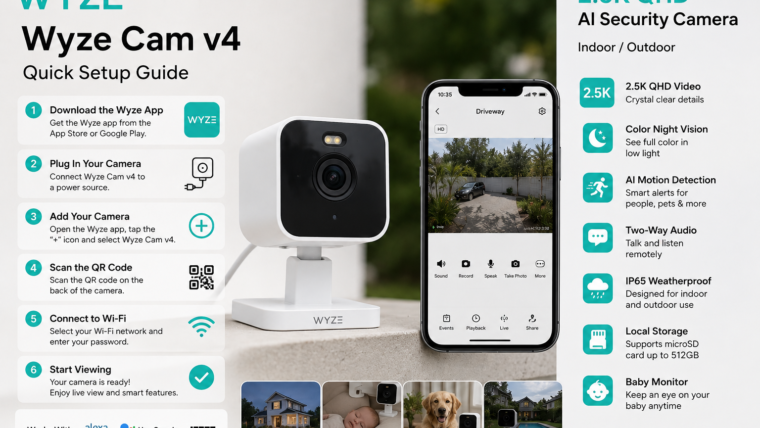
WYZE Cam v4 Complete Guide
2.5K AI Security Camera for Home Security, Baby Monitoring, Pet Monitoring & Outdoor Surveillance
Introduction
WYZE Cam v4 is the newest generation smart security camera from WYZE. It features 2.5K QHD video resolution, Color Night Vision, AI-powered motion detection, two-way audio, built-in spotlight, weather-resistant design, and 24/7 recording support. Designed for both indoor and outdoor use, it is ideal for home security, baby monitoring, pet monitoring, office surveillance, and property protection.
Premium security features at an affordable price with crystal-clear 2.5K video, AI alerts, Color Night Vision, and indoor/outdoor versatility.
Main Features
📹 2.5K QHD Resolution
Capture sharp and detailed footage with 2560×1440 high-definition video quality.
🌙 Enhanced Color Night Vision
See clear color images even in low-light conditions for better nighttime security.
🤖 AI Motion Detection
Detect people, motion, packages, pets and important activities more accurately.
🔦 Motion Activated Spotlight
Built-in spotlight automatically illuminates dark areas when motion is detected.
🎤 Two-Way Audio
Talk and listen through the camera using the WYZE mobile application.
🌧 IP65 Weather Resistance
Suitable for both indoor and outdoor installation in various weather conditions.
💾 Local Storage
Supports MicroSD cards up to 512GB for continuous recording.
📱 Smart App Control
View live video, playback recordings and receive alerts remotely.
Technical Specifications
| Specification | Details |
|---|---|
| Video Resolution | 2.5K QHD (2560 × 1440) |
| Night Vision | Enhanced Color Night Vision |
| Weather Rating | IP65 |
| Audio | Two-Way Audio |
| Storage | MicroSD Card Up To 512GB |
| Connectivity | Wi-Fi |
| Smart Alerts | AI Motion Detection |
| Spotlight | Built-In Motion Activated Spotlight |
| Indoor Use | Supported |
| Outdoor Use | Supported |
WYZE Cam v4 Setup Guide
- Download the WYZE App from Google Play Store or App Store.
- Create a new WYZE account.
- Plug in the camera and wait for setup mode.
- Open the WYZE app and tap Add Device.
- Select WYZE Cam v4.
- Connect the camera to your Wi-Fi network.
- Scan the QR code displayed on your phone.
- Wait for successful pairing.
- Name your camera.
- Start live monitoring.
Best Uses For WYZE Cam v4
- Home Security Monitoring
- Front Door Surveillance
- Baby Monitoring
- Pet Camera Monitoring
- Office Security
- Garage Protection
- Apartment Security
- Indoor Room Monitoring
- Outdoor Property Surveillance
- Vacation Home Monitoring
Advantages
- Excellent 2.5K video quality
- Affordable pricing
- Enhanced Color Night Vision
- AI-powered alerts
- Weatherproof outdoor operation
- MicroSD local recording
- Built-in spotlight
- Easy installation process
- Baby monitor functionality
- Pet monitoring support
Pros & Cons
| Pros | Cons |
|---|---|
| Sharp 2.5K Resolution | Requires Power Cable |
| Color Night Vision | No Battery Operation |
| Indoor & Outdoor Usage | Advanced AI Requires Subscription |
| Affordable Price | Depends On Wi-Fi Connection |
| Local Storage Support | Cloud Features May Cost Extra |
Final Verdict
WYZE Cam v4 is one of the best budget-friendly smart security cameras available. With 2.5K QHD video, AI detection, Color Night Vision, weatherproof protection, local recording, spotlight security and remote monitoring, it delivers excellent value for homeowners, parents, pet owners and small businesses.
Whether you need a reliable baby monitor, pet camera or complete home security solution, WYZE Cam v4 provides premium features without the premium price tag.

Leave a Reply