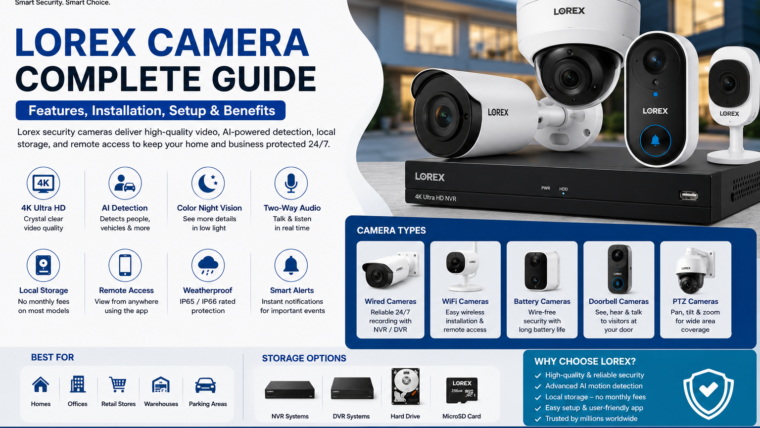
Lorex Camera Guide
Explore advanced security solutions with Lorex cameras featuring AI motion detection, local storage, 4K video quality, and remote monitoring capabilities.
4K Ultra HD
Capture crystal-clear footage with resolutions from 1080p to 4K Ultra HD.
AI Detection
Identify people, vehicles, animals, and packages with intelligent analytics.
Color Night Vision
Monitor your property day and night with enhanced low-light visibility.
Local Storage
Store footage securely using NVRs, DVRs, hard drives, or microSD cards.
Overview
Lorex offers a wide range of wired, wireless, battery-powered, and video doorbell cameras for homes and businesses. Known for reliable performance and privacy-focused local storage, Lorex security systems help protect your property with smart monitoring and easy remote access.
Popular Lorex Camera Types
Wired Security Cameras
- 24/7 continuous recording
- Reliable network connection
- NVR and DVR compatibility
Wireless WiFi Cameras
- Easy installation
- Remote smartphone access
- Smart notifications
Battery-Powered Cameras
- Wire-free setup
- Flexible placement options
- Rechargeable batteries
Video Doorbell Cameras
- Two-way communication
- Package detection
- Visitor notifications
PTZ Cameras
- Pan, tilt, and zoom control
- Wide-area monitoring
- Auto-tracking support
Technical Specifications
| Feature | Specification |
|---|---|
| Camera Types | Wired, WiFi, Battery, Doorbell, PTZ |
| Resolution | 1080p to 4K Ultra HD |
| Night Vision | Infrared & Color Night Vision |
| Motion Detection | AI Person, Vehicle, Animal & Package Detection |
| Connectivity | Ethernet, WiFi |
| Storage | DVR, NVR, Hard Drive, MicroSD Card |
| Weather Rating | IP65 / IP66 |
| Mobile Access | Android & iOS |
Benefits of Lorex Cameras
🏠 Complete Protection
Monitor indoor and outdoor areas with a wide range of camera options.
📲 Remote Monitoring
View live footage and recordings from anywhere using the mobile app.
🔔 Smart Alerts
Receive instant notifications when important activity is detected.
💰 No Monthly Fees
Many Lorex systems offer local storage without subscription costs.
Installation & Setup Guide
- Choose the right camera type for your location.
- Mount the camera securely at the desired position.
- Connect the camera to power or an NVR system.
- Install the Lorex mobile application.
- Add the camera by scanning the QR code.
- Connect to your WiFi network or NVR.
- Configure recording schedules and motion alerts.
- Test live view and notification settings.
Frequently Asked Questions
Do Lorex cameras require a subscription?
Many Lorex systems support local storage and do not require monthly subscription fees.
Can Lorex cameras work without internet?
Yes. Local recording can continue without internet access, but remote viewing requires an active connection.
Are Lorex cameras weatherproof?
Most outdoor models feature IP65 or IP66 weather resistance.
Can I access my cameras remotely?
Yes. The Lorex mobile app allows secure monitoring and playback from anywhere.

Leave a Reply