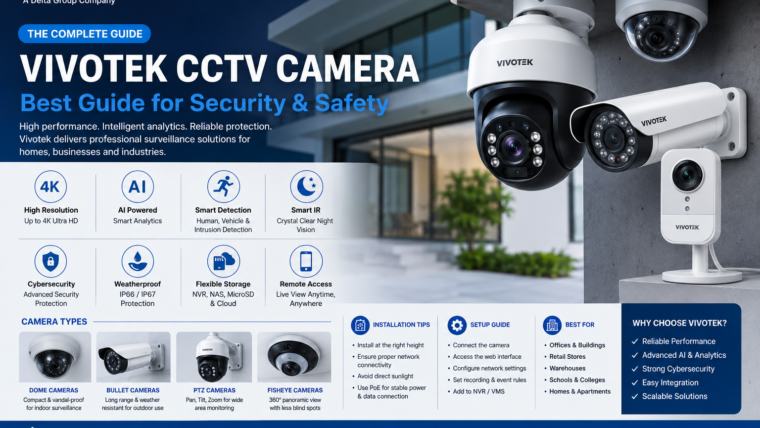
Vivotek CCTV Camera Guide
Discover advanced AI-powered surveillance with Vivotek CCTV cameras featuring high-resolution imaging, smart analytics, cybersecurity protection, and reliable remote monitoring.
Up to 4K Resolution
Capture clear and detailed footage with resolutions ranging from 2MP to 12MP and 4K Ultra HD.
AI Analytics
Advanced AI features including human detection, vehicle detection, and intrusion alerts.
Smart IR Night Vision
Monitor your property day and night with intelligent infrared technology.
Cybersecurity Protection
Secure boot, encrypted communication, and firmware protection ensure safe surveillance.
Overview
Vivotek CCTV cameras are designed for homes, offices, retail stores, warehouses, educational institutions, and industrial environments. Their advanced AI capabilities, high-quality imaging, and robust cybersecurity features make them a trusted choice for modern surveillance systems.
Popular Camera Types
Dome Cameras
- Compact and discreet design
- Wide viewing angles
- Ideal for indoor environments
Bullet Cameras
- Long-range outdoor monitoring
- Weather-resistant construction
- Easy wall mounting
PTZ Cameras
- Pan, tilt, and zoom control
- Auto tracking features
- Suitable for large areas
Fisheye Cameras
- 360° surveillance coverage
- Reduced blind spots
- Perfect for open spaces
Technical Specifications
| Feature | Specification |
|---|---|
| Camera Types | Dome, Bullet, PTZ, Fisheye |
| Resolution | 2MP to 12MP, 4K Ultra HD |
| Night Vision | Smart IR Technology |
| AI Analytics | Human, Vehicle & Intrusion Detection |
| Connectivity | PoE, Ethernet, WiFi (Selected Models) |
| Storage | NVR, NAS, MicroSD Card, Cloud |
| Weather Rating | IP66 / IP67 |
| Vandal Resistance | IK10 (Selected Models) |
| Mobile Access | Android & iOS |
Benefits of Vivotek CCTV Cameras
🏢 Professional Surveillance
Designed for both residential and commercial security applications.
📱 Remote Monitoring
Access live footage and recordings from anywhere using compatible apps.
🔔 Smart Notifications
Receive real-time alerts when unusual activity is detected.
☔ Built for Outdoors
Weatherproof and vandal-resistant designs ensure long-lasting performance.
Installation & Setup Guide
- Choose the appropriate camera type for your location.
- Mount the camera securely in the desired area.
- Connect the camera using PoE or a power adapter.
- Configure network settings through the web interface.
- Connect the camera to an NVR or NAS system.
- Adjust motion detection and recording preferences.
- Enable remote access and notifications.
- Regularly update the firmware for security improvements.
Frequently Asked Questions
Do Vivotek cameras support PoE?
Yes. Most Vivotek IP cameras support Power over Ethernet (PoE).
Can Vivotek cameras work without an NVR?
Yes. Many models support recording directly to a microSD card or NAS storage.
Are Vivotek cameras weatherproof?
Outdoor models typically feature IP66 or IP67 weather resistance.
Can I access my cameras remotely?
Yes. You can view live footage, playback recordings, and manage settings through compatible software and mobile applications.

Leave a Reply