Eufy Camera Guide: Setup, Features, Troubleshooting & Benefits (2026)
Everything you need to know about Eufy security cameras, including installation, storage options, troubleshooting tips, and frequently asked questions.
Introduction
Eufy security cameras are a popular choice for homeowners and small businesses seeking reliable surveillance without expensive monthly fees. Developed by Anker Innovations, Eufy cameras offer high-resolution video, AI-powered detection, local storage, and easy smart home integration.
Why Choose Eufy Cameras?
- No mandatory monthly subscription fees
- Local video storage on many models
- AI-powered human, pet, vehicle, and package detection
- Video quality up to 4K Ultra HD
- Long battery life on wireless models
- Simple DIY installation
- Compatible with Amazon Alexa and Google Assistant
- Secure encrypted data storage
Popular Eufy Camera Types
Indoor Cameras
- Motion tracking
- Night vision
- Two-way audio
- Pan and tilt support
Outdoor Cameras
- Weather-resistant design
- Spotlight and siren features
- Battery or wired options
- Color night vision
Video Doorbells
- Package detection
- Visitor alerts
- Remote communication
- Local storage support
Floodlight Cameras
- Powerful LED lighting
- Wide viewing angles
- Enhanced outdoor security
Key Features of Eufy Cameras
AI Detection
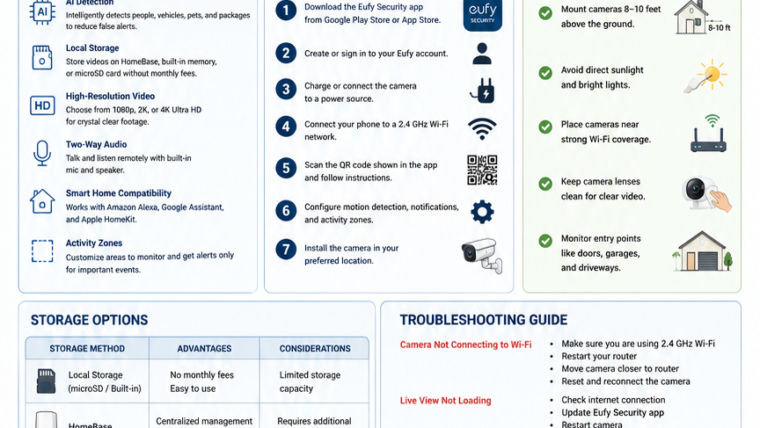
Eufy cameras intelligently identify people, vehicles, pets, and packages to reduce false alerts.
Local Storage
Store recordings using HomeBase, built-in memory, or microSD cards without paying monthly fees.
High-Resolution Video
Choose from 1080p, 2K, or 4K video quality depending on your camera model.
Two-Way Audio
Speak with visitors and monitor activity remotely using the Eufy Security app.
Smart Home Compatibility
Many models support Amazon Alexa, Google Assistant, and Apple HomeKit.
Activity Zones
Create custom monitoring zones to receive alerts only from important areas.
How to Set Up a Eufy Camera
- Download the Eufy Security app from the Google Play Store or Apple App Store.
- Create or sign in to your Eufy account.
- Charge or connect the camera to a power source.
- Ensure your phone is connected to a 2.4 GHz Wi-Fi network.
- Scan the QR code displayed in the app.
- Configure motion detection, notifications, and activity zones.
- Install the camera in your preferred location.
Installation Tips
- Mount outdoor cameras 8–10 feet above the ground.
- Avoid direct sunlight and bright lights.
- Place cameras near strong Wi-Fi coverage.
- Keep camera lenses clean for clear video quality.
- Monitor entry points such as doors, garages, and driveways.
Eufy Camera Storage Options
| Storage Method | Advantages | Considerations |
|---|---|---|
| Local Storage | No monthly fees | Limited capacity |
| HomeBase | Centralized management | Requires additional hardware |
| Cloud Backup | Remote access to recordings | Subscription may apply |
Common Eufy Camera Problems and Solutions
Camera Not Connecting to Wi-Fi
- Use a 2.4 GHz network.
- Restart your router.
- Move the camera closer to the router.
- Reset and reconnect the device.
Live View Not Loading
- Check your internet connection.
- Update the Eufy Security app.
- Restart the camera.
- Update the camera firmware.
Motion Detection Not Working
- Increase motion sensitivity.
- Adjust activity zones.
- Remove obstructions.
- Verify motion detection is enabled.
Battery Draining Quickly
- Reduce motion sensitivity.
- Limit live viewing sessions.
- Improve Wi-Fi signal strength.
- Reduce recording frequency.
Notifications Not Working
- Enable notifications on your phone.
- Disable battery optimization for the app.
- Verify notification settings in the app.
How to Reset a Eufy Camera
- Locate the Sync or Reset button on the camera.
- Press and hold the button for approximately 10 seconds.
- Wait for the voice prompt or LED indicator.
- Reconnect the camera using the Eufy Security app.
Privacy and Security Features
- Local data storage
- AES encryption
- Two-factor authentication
- Secure account protection
- Optional cloud storage
Pros and Cons
Pros
- No mandatory subscription fees
- Excellent video quality
- Easy installation
- Strong privacy controls
- Long battery life
- Advanced AI detection
Cons
- Some features vary by model
- Cloud storage may require a subscription
- Limited smart home support on certain devices
Frequently Asked Questions
Do Eufy cameras require a monthly subscription?
No. Most Eufy cameras support local storage without requiring a subscription.
Can Eufy cameras work without Wi-Fi?
Some local recording features may continue to work, but remote access requires an internet connection.
How long does the battery last?
Battery life varies by model and usage, but many Eufy cameras operate for several months on a single charge.
Can multiple users access the same camera?
Yes. You can share camera access with family members through the Eufy Security app.
Final Thoughts
Eufy cameras offer an excellent combination of affordability, privacy, and smart features. Their local storage capabilities and AI-powered detection make them a strong choice for homeowners and small businesses seeking reliable security without recurring subscription costs.

Leave a Reply