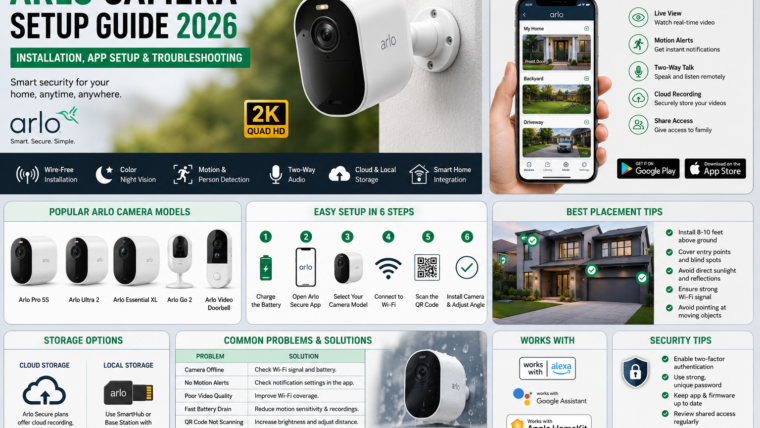
Arlo Camera Setup Guide 2026: Installation, App Setup & Troubleshooting
Arlo cameras are among the most popular wireless security solutions for homes and businesses. They offer advanced features such as high-resolution video, AI-powered detection, night vision, and remote monitoring through the Arlo Secure app.
Popular Arlo Camera Models
- Arlo Pro 5S
- Arlo Ultra 2
- Arlo Essential XL
- Arlo Go 2
- Arlo Video Doorbell
Key Features
- 2K and 4K video quality
- Wire-free installation
- Color night vision
- Motion and person detection
- Two-way audio
- Built-in siren on selected models
- Cloud and local storage options
- Smart home integration
What’s Included in the Box?
- Arlo camera
- Rechargeable battery
- Charging cable
- Magnetic wall mount
- Mounting screws
- Quick start guide
- SmartHub or Base Station (selected bundles)
Before You Begin
- Stable Wi-Fi connection
- Your Wi-Fi password
- Android or iPhone smartphone
- Arlo Secure app installed
- Fully charged camera battery
Download the Arlo Secure App
Download the official Arlo Secure app from the Google Play Store or Apple App Store and create an account.
How to Set Up an Arlo Camera
Step 1: Charge the Battery
Fully charge the camera battery before installation.
Step 2: Open the Arlo Secure App
Launch the app and tap Add Device.
Step 3: Select Your Camera Model
Choose your Arlo camera model from the device list.
Step 4: Connect to Wi-Fi
Follow the on-screen instructions to connect the camera to your home network.
Step 5: Scan the QR Code
Hold your smartphone approximately 6–8 inches away from the camera lens until you hear a confirmation sound.
Step 6: Install the Camera
Mount the camera securely and adjust the viewing angle.
Best Installation Tips
- Install cameras 8–10 feet above the ground.
- Cover entry points such as doors, garages, and driveways.
- Avoid direct sunlight and reflective surfaces.
- Ensure strong Wi-Fi coverage.
- Avoid pointing cameras toward moving trees or busy roads.
Storage Options
Cloud Storage
Arlo Secure subscription plans provide cloud recording, AI detection, and extended video history.
Local Storage
Selected SmartHub and Base Station models support local storage using USB drives or microSD cards.
Smart Home Integration
- Amazon Alexa
- Google Assistant
- Apple HomeKit (selected models)
Example voice commands:
- “Alexa, show the front door camera.”
- “Hey Google, show the backyard camera.”
Common Arlo Problems & Solutions
| Problem | Solution |
|---|---|
| Camera offline | Check Wi-Fi signal strength and battery level. |
| QR code not scanning | Increase phone brightness and adjust the distance. |
| No motion alerts | Verify notification settings in the app. |
| Poor video quality | Improve Wi-Fi coverage. |
| Fast battery drain | Reduce motion sensitivity and recording frequency. |
| Camera not pairing | Reset the camera and repeat the setup process. |
How to Reset an Arlo Camera
- Locate the sync or reset button.
- Press and hold it until the LED flashes amber.
- Wait for the camera to restart.
- Add the device again using the Arlo Secure app.
Refer to your camera model’s user manual for exact reset instructions.
- Enable two-factor authentication.
- Use a strong, unique password.
- Keep the app updated.
- Install firmware updates regularly.
- Review shared access permissions periodically.
Frequently Asked Questions
Do Arlo cameras require a subscription?
No. Basic features work without a subscription, but cloud recording and AI detection require an Arlo Secure plan.
Can Arlo cameras work without Wi-Fi?
Most features, including remote access and notifications, require an internet connection.
How long does the battery last?
Battery life varies by model and usage but typically lasts several months between charges.
Can multiple users access the same camera?
Yes. You can securely share camera access with family members through the Arlo Secure app.
Are Arlo cameras weatherproof?
Many outdoor Arlo models are weather-resistant and designed for year-round use.
Arlo cameras offer premium security features, easy installation, and reliable remote monitoring, making them an excellent choice for modern smart homes.

Leave a Reply