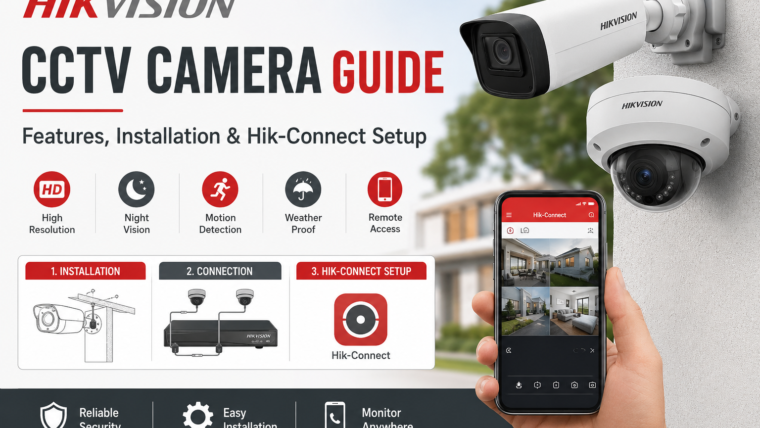
Hikvision CCTV Cameras: Complete Guide to Features, Setup, Installation, and Mobile App
Introduction
Hikvision is one of the world’s leading video surveillance manufacturers, offering a wide range of security solutions for homes, offices, retail stores, warehouses, and large enterprises.
Hikvision cameras are known for their high-quality video recording, intelligent detection features, easy mobile access, and reliable performance in different environments.
In this guide, you’ll learn about Hikvision camera types, key technologies, installation steps, mobile app setup, and common troubleshooting solutions.
Popular Types of Hikvision Cameras
Dome Cameras
Hikvision dome cameras are designed for indoor environments such as offices, homes, shops, and reception areas.
Bullet Cameras
Bullet cameras are ideal for outdoor surveillance and long-distance monitoring.
PTZ Cameras
Pan-Tilt-Zoom (PTZ) cameras allow users to remotely move the camera, zoom in on specific areas, and monitor large spaces.
Turret Cameras
Turret cameras combine the benefits of dome and bullet cameras, offering flexible installation and excellent night vision performance.
Wi-Fi Cameras
Hikvision Wi-Fi cameras provide easy installation and remote access without requiring extensive cabling.
Key Hikvision Technologies
ColorVu Technology
ColorVu technology delivers full-color video around the clock, even in low-light conditions, helping users identify important details such as vehicle colors and clothing.
AcuSense Technology
AcuSense uses AI-powered analytics to distinguish between humans, vehicles, and irrelevant motion such as rain, leaves, or animals.
Smart Hybrid Light
Smart Hybrid Light cameras automatically switch between infrared and white light modes to provide clear images in various lighting conditions.
Hik-Connect Mobile App
The Hik-Connect app allows users to view live video, receive motion alerts, control PTZ cameras, play back recordings, and manage multiple devices remotely.
How to Install a Hikvision Camera
Step 1: Select the Installation Location
- Main entrances
- Driveways
- Parking areas
- Hallways
- Backyards
- Storefronts
Avoid installing cameras directly facing bright light sources.
Step 2: Mount the Camera
Secure the camera using the included mounting bracket and screws. Adjust the viewing angle before tightening all fittings.
Step 3: Connect the Camera
For IP cameras:
- Connect the camera to the NVR using an Ethernet cable.
- Use PoE (Power over Ethernet) if supported.
For analog cameras:
- Connect the camera to the DVR using coaxial cables.
- Attach the power adapter.
Step 4: Configure the Recorder
- Date and time settings
- Recording schedule
- Motion detection zones
- Video quality
- Storage options
Step 5: Add the Device to Hik-Connect
- Download the Hik-Connect app.
- Create an account.
- Scan the QR code on the camera or recorder.
- Complete the device verification process.
- Start viewing live video remotely.
Common Hikvision Camera Problems and Solutions
Camera Offline
- Check the power supply.
- Verify network connections.
- Restart the router and recorder.
- Confirm internet access.
No Video Signal
- Check cable connections.
- Verify the correct input channel.
- Restart the camera and recorder.
Poor Night Vision
- Clean the camera lens.
- Remove nearby light reflections.
- Adjust exposure settings.
Motion Alerts Not Working
- Enable motion detection.
- Configure detection zones correctly.
- Update the camera firmware.
Maintenance Tips for Hikvision Cameras
- Clean camera lenses regularly.
- Update firmware when available.
- Test recordings every week.
- Check storage capacity.
- Inspect outdoor cameras for damage.
- Change default passwords immediately.
Important Considerations Before Buying
- Indoor or outdoor installation
- Required video resolution
- Night vision requirements
- Storage capacity
- Wired or wireless setup
- Number of cameras needed
- Mobile app support
Conclusion
Hikvision cameras offer a reliable combination of high-resolution imaging, AI-powered detection, and easy remote access.
Features such as ColorVu, AcuSense, Smart Hybrid Light, and the Hik-Connect app make Hikvision a popular choice for both residential and commercial security systems.
Whether you’re securing your home, office, or business, choosing the right Hikvision camera and configuring it correctly will help ensure better safety and peace of mind.

Leave a Reply